Four screens between a saved place and turn-by-turn navigation
A close reading of Google's navigation example: where a place becomes a route, why a familiar layout still consumes another step, and what Back must preserve.
Yahagu Research · Published 2026-09-08 · Sources checked 2026-09-08 · 7 min read
Android for Cars templated navigation. Official design examples dated 5 September 2025, read alongside current library guidance. Applicable as a platform reference, not a vehicle comparison.
The choice hidden behind a destination tap
A driver opens a recent place and sees two ways to get there. One route is quicker; the other is described as less busy. Should tapping the place start the fastest route, or should the driver choose first? That decision changes the meaning of every subsequent control, including Back.
Google's sample flow reserves a screen for choosing the route before guidance begins. It uses four views: a category menu, a place list, route alternatives and active navigation. [1] The useful design question is whether a person who has chosen a destination has also agreed to a particular route. In this example, those are separate commitments.
For a familiar commute, an extra choice may add little value. For an unfamiliar destination, a driver may prefer a different road despite a longer estimate. A product team therefore needs to decide which tasks justify route comparison. Removing the comparison screen is a product decision, not just a way to make a flow diagram shorter.
1. Choose a collection, before choosing a place
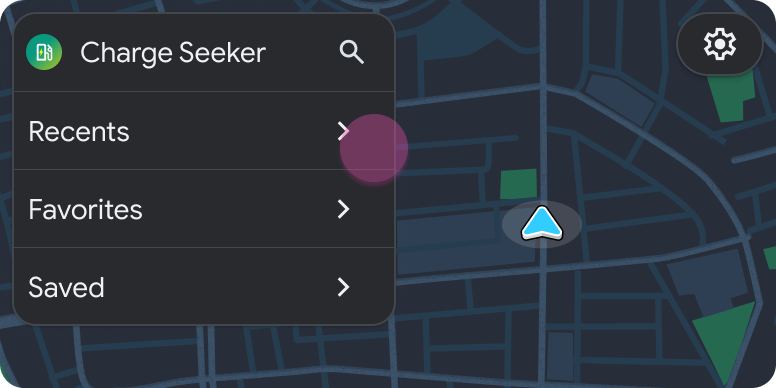
The first image offers collections rather than destinations. A map occupies the rest of the display, but it cannot yet explain which destination the driver will choose. This is orientation, not route confirmation.
That distinction matters when comparing a menu-led design with a nearby-results design. Collections favour someone returning to a known place. Nearby results favour someone who needs an option now. Neither can be called faster without defining the task. Counting the number of visible rows misses the more consequential choice: what knowledge does the interface expect the driver to bring?
In a charging search, for example, a familiar station and a suitable station are not necessarily the same thing. That is an application scenario, not a claim about the sample's charging data. A recents shortcut would still need a policy for unavailable or incompatible results.
2. Preserve the place, not its row number
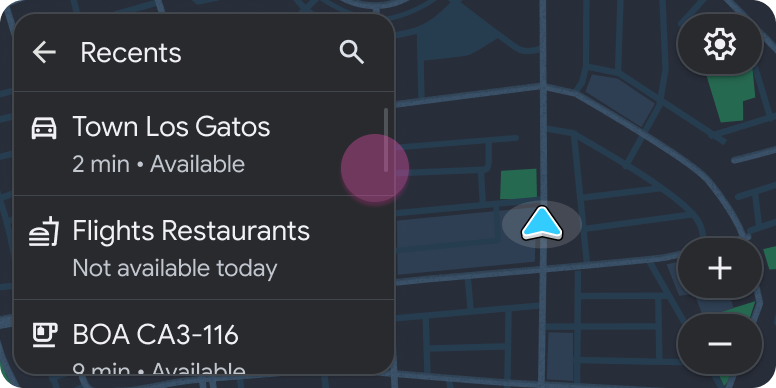
The second image puts availability beside the choices. That information can affect whether a location is worth selecting, but a static screen does not tell us whether an unavailable item is disabled, opens details, or remains navigable. Those behaviours cannot be inferred from text colour or a label.
Consider a refresh that moves the second place to the top while the driver is opening it. A selection stored as 'row 2' could now refer to a different place. A stable place identifier avoids that ambiguity: use it for the selected row, the map marker and the destination passed to route calculation. This is a recommended implementation rule, not a defect demonstrated by the image.
Android's Map + Content guidance recommends corresponding map markers for listed places and route highlighting after a selection. [2] The practical consequence is to update the list and map from the same selected object. Two individually plausible views can otherwise disagree about the destination.
3. Make the route commitment explicit
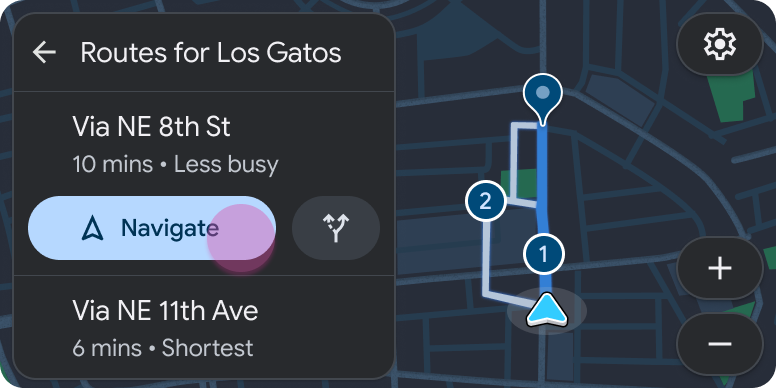
At route selection, the driver is choosing how to reach an already selected place. Putting the action beside the route helps associate the commitment with that alternative. A single global action would need another equally clear indication of which route it will start.
The important implementation boundary is the Navigate action. Before it, an alternative is under consideration. After a successful start, one route should own guidance. Merely changing a map highlight must not silently change the committed route. If the route engine rejects or replaces the candidate, the interface needs to show that outcome instead of assuming that a button press succeeded.
A second asynchronous race is possible here. The driver selects a different destination before an earlier route request finishes. A late response for the old place must not replace the new preview. Associate results with both the destination and the request that produced them. The exact mechanism depends on the app, but the user-facing requirement is concrete: route choices must still belong to the place named on screen.
4. Guidance changes what cancellation means
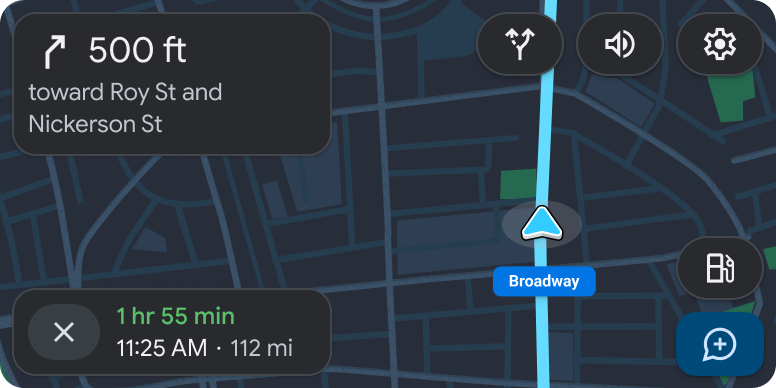
Once guidance is active, the driver needs an instruction rather than another catalogue of places. In the sample, the next manoeuvre takes the prominent position previously used for browsing. [1] A review should now distinguish returning to a browsing view from stopping the trip. Those actions may coexist, but they should not be represented as the same state change.
There is also an evidence trap. The route-choice image shows estimates of 10 and 6 minutes; this guidance image shows 1 hour 55 minutes. These are educational illustrations, not a reliable recording of a single journey. They cannot demonstrate that the selected alternative produced the displayed arrival estimate, that traffic changed, or that a particular route engine made an error.
That limitation does not make the example useless. It tells us what we can compare: the role of the controls and the sequence of decisions. Measured task time, glance duration and route consistency would require a recording or an instrumented test on a specified build.
Why the same layout can consume another step
Android separates template quota from the number of Screen objects. Sending additional templates from one Screen can consume the quota; reusing a screen instance is not an exemption. The host also gives particular templates task-ending semantics. NavigationTemplate can reset the count because guidance begins a new task. [4]
The sample's published counts are 1, 2, 3 and then 1 for navigation. [1] Treat them as template-task accounting, not as a measurement of taps or seconds. In particular, opening the place list introduces different content even though the map-and-list composition stays familiar.
Refresh rules depend on the template and on Adaptive task limits. The latter changes which updates qualify, and availability varies by vehicle and platform context. [3] A design review that simply labels every list update 'refresh' can therefore underestimate the task budget.
The distinction becomes useful when somebody proposes another filter screen or a mandatory confirmation. Check where that screen enters the task, whether it adds a template and what type would land at the limit. Do not approve the flow because its visual design reuses the previous page.
| Measure | What it records | What it cannot prove |
|---|---|---|
| User actions | Selections, presses and other interactions in the task | A low action count does not establish low attention demand. |
| Template steps | Host accounting for content transitions, refreshes and resets [3][4] | Reusing a layout or a Screen object does not make an update free. |
| Active destination and route | The place under review, then the route accepted for guidance | A highlighted marker does not prove that navigation has started. |
Back should restore a decision, not just a screen
The library supplies a screen stack and a standard Back action that pops it. [5] That solves a navigation mechanism. It does not define the product's policy for retaining a filter, a map viewport or a selected destination.
An application can restore the correct screen class and still make the driver start over. In the route-selection example, returning to the place list should preserve enough context to compare another place without reconstructing the original search. Our recommended default is to retain the collection and search context, keep any still-valid place selection, and make changed availability visible.
The library also places requirements on the template returned after a pop: its type must match what that screen last returned. [4] Product state restoration and valid template restoration need to be tested together, especially if one screen can return several kinds of content.
Updating the data model alone is not a rendered update. Screen.invalidate requests another template, which the host obtains through onGetTemplate. [6] A stale route result can therefore cause trouble even if the visible screen appears unchanged. Cancel or disregard obsolete requests before allowing them to update the state used by the next template.
A concrete failure review
The following cases are proposed tests derived from the state transitions above, not failures observed in Google's sample.
| Event | Expected user-visible result | State that must remain consistent |
|---|---|---|
| A place list refreshes during selection | The opened details or routes still belong to the selected place, or the app explains that it is no longer available. | Stable place identity, not the previous row position. |
| The driver returns from route choices | The previous collection and useful search context remain available; no route starts merely because Back was pressed. | Browsing context separated from committed guidance. |
| An old route request finishes late | Results for the previous destination do not replace the current destination's routes. | Destination identity and request generation. |
| Navigate fails to start guidance | The app reports the failure and retains a usable selection; it does not display guidance as if the start succeeded. | Candidate route separated from accepted route. |
Where this leaves the product decision
For this task, I would retain an explicit route choice when meaningful alternatives exist, and make the accepted route a separate state from the destination being examined. I would test return-to-list and late route responses before treating the happy-path screenshots as a finished interaction.
That recommendation is about this decision structure, not a universal demand for four screens. A product with one suitable route may combine steps; a point-of-interest app may hand navigation to another application. The comparison still needs to identify where the user commits, what remains reversible and how the system reports success.
The sample does not establish which design is safest or quickest. It does expose a review mistake that screenshots alone invite: confusing a familiar-looking map with continuity of the driver's decision. The evidence to request from a working implementation is the selected place, the candidate route and the accepted route across forward, back and failed transitions.
Sources & scope
Analysis of official design examples and library documentation, not a vehicle test. The four images describe a sample flow; their journey data is not internally consistent. Failure scenarios and recommended state handling below are Yahagu's analysis, not observed defects.
- Browse locations and start NavigationEnglish original · 5 September 2025; checked 8 September 2026
- Map + Content templateEnglish original · 30 July 2025; checked 8 September 2026
- Plan task flowsEnglish original · 5 September 2025; checked 8 September 2026
- Template restrictionsEnglish original · 5 March 2026; checked 8 September 2026
- Implement screen navigationEnglish original · 24 June 2026; checked 8 September 2026
- Refresh the contents of a templateEnglish original · 5 March 2026; checked 8 September 2026
- Android Developers content and image licensingEnglish original · Checked 8 September 2026
What would you add?
Share a different implementation, flag a correction, or tell us where this analysis helps with your work. A public source link is welcome.
Your message and email are stored privately for handling this request. Do not include confidential product information.
Related analysis
 01
01Why a parked car can still miss a background refresh
Garage Mode supplies an idle work window, not proof that a user's content refreshed. Compare job registration, user-data access, execution and the version available after an interruption.
 02
02Which assistant owns the steering-wheel voice button?
The Canadian 2025 V60 Cross Country manual assigns the same long press to different phone assistants. A disconnect scenario shows what an integration test must record before judging media commands.
 03
03Choosing when to commit an Android SDV update
A VM can boot successfully while its consumers disagree about a changed service. A worked compatibility example explains what an integrator should verify before committing an Android SDV update.
 04
04Audio focus loss is not proof of silence
A navigation prompt interrupts music. The focus log looks correct, but it cannot tell you what reached the driver's seat. An AAOS review needs separate evidence for policy, player behavior and output.
 05
05A readable temperature is not a successful climate command
A climate control can show a valid temperature and still fail to change it. For an AAOS integration, the useful distinction is between the reported target, the pending request and the temperature the system measures.
 06
06Passenger displays need their own restriction contract
A passenger video experience cannot rely on one vehicle-wide moving flag. AAOS separates display restrictions, activity blocking and supported background audio. Here is how those boundaries change an integration review.
 07
07Physical buttons still need a state model
Volkswagen gives climate and audio tasks fixed locations. BMW's announced steering wheel highlights actions as they become available. An interrupted call shows why both hardware and software state belong in the review.
 08
08The LYRIQ supports CarPlay. Which system plans the charging stop?
A charging trip can cross a phone planner, projected maps and built-in navigation. The useful comparison is what each path retains, recalculates and confirms before arrival.
 09
09Car app sign-in: what happens after the phone says done?
The phone approves the account, but the car still needs a result. A review of parked sign-in, delayed authorization and recovery paths that send drivers back to the right task.